Posts

Back to the VCL for CodeSnip 5 Belvedere

Well, my cunning plan to make CodeSnip 5 cross platform by using the FMX framework didn't survive contact with reality for long! About as long as it took me to realise that SynEdit is a VCL component, in fact. And I really want to use SynEdit. Another factor was my discovery that Delphi doesn't support GUI applications on Linux out of the box. And, yes, I know there's add on support in Delphi 11 Enterprise for GUI Linux, but that's complicating things slightly. So that further scuppered my cross platform plans. So CodeSnip is to remain Windows only. Ho hum. I'm telling myself it doesn't matter that much because CodeSnip is mainly targeted at managing Delphi code, and the Delphi IDE is Windows only too!

New year's resolution: Have a 3rd attempt at CodeSnip v5

Image
Where have we heard this before? OK, it was way back in 2013 when I first decided to try to develop CodeSnip 5 - a quite radically different version of CodeSnip than version 4. It was code named parsnip , as in pa[r] scal code snip  - really! Along the way that morphed into CodeSnip pagoda  (I can't remember why) and then floundered.  In 2020 there was a partial reboot: pavilion . This was based on parsnip  and was used to investigate one of two possible ways to strip the web service code out of CodeSnip before the services closed in June. It turned out it was quicker to revise CodeSnip 4, so pavilion  got abandoned too. Introducing CodeSnip Belvedere And now, on 1st January 2022, I've just created a new belvedere  branch off the CodeSnip 4.19.0 code tree to have yet another attempt at CodeSnip 5. What makes me think I might succeed this time? Well, I think the main reason the other attempts failed is that I tried to grow v5 from the a code base that goes...

Released CodeSnip 4.19.0

Image
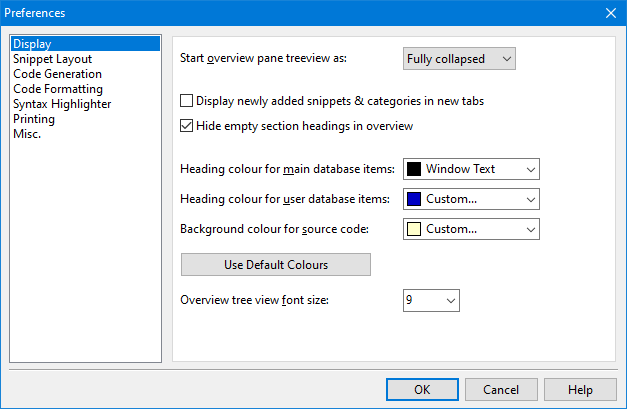
Just in time for the new year, CodeSnip v4.19.0 has been released. This contains the promised re-organisation of the Preferences dialogue box to get rid of the confusing multi-line tabs. The dialogue box now has a list of pages in a pane on the left, with the relevant options appearing on the right. I've finally worked out how to make the size of the font in the overview pane's tree view customisable - it's only taken me a year to respond to this request. Finally, there's a fix to an obscure bug in the legacy Code Snippets Database loader code that I doubt has ever bothered anyone - but probably would if it wasn't fixed! As usual you can download the program from the delphidabbler/codesnip GitHub repo's Releases page or from SourceForge: Download Standard Edition Download Portable Edition Source is available to download from both the above repos or you can fork away in the GitHub repo . For a complete list of changes see the change log .

Code Snippets Database collection - HOTFIX 2.1.1 released

Whoops! Following the release of v2.1.0 of the  Code Snippets Database  a few days ago, I've just run  CodeSnip  in the debugger only to find it was detecting and gently ignoring some errors when loading the release! So I've rushed out a hotfix: v2.1.1. If you followed my advise a few days back and updated to v2.1.0, you really need to get this hotfix. Grab it from the project's GitHub  release page for hotfix 2.1.1 . Use CodeSnip's Database | Install or Update DelphiDabbler Snippets Database  menu option for details of how to install it. Whoops!

Released v2.1.0 of the Code Snippets Database collection

Image
I've just completed v2.1.0 of the  Code Snippets Database collection . This version tidies up the meta-data to make it more consistent and to leave behind some old legacy data that dates back to the CodeSnip program's early days. Also fixed some minor bugs and updated a few descriptions. No new snippets though. Despite there being no new snippets in this release,  CodeSnip  users are strongly advised to update since future CodeSnip releases will probably drop backwards compatibility with the now deprecated v2.0.x database file format. Information on how to update can be found from within CodeSnip by choosing the  Database | Install or Update DelphiDabbler Snippets Database  menu option. You can get the new version and read the full change log on the project's  GitHub release page .

Released CodeSnip patch v4.18.1

Image
I've just released v4.18.1 of CodeSnip . This release is fixes a few minor bugs, updates OS version detection and has a little bit of refactoring. The full change log is as follows: Improved handling of control and whitespace characters in generated HTML: revised which characters were converted to HTML character attributes / entities. Fixed error in title of Save Annotated Source  dialogue box. Replaced use 3rd party GIFImage unit with similar GIFImg unit from Delphi XE VCL. Corrected help topic for Dependencies dialogue box to describe Save & Close  button. Operating system detection code was updated to correctly detect Windows 11 and Windows 10 version 21H2. Some refactoring. Updated license document following removal of dependency on GIFImage unit. Download the new version from CodeSnip's GitHub releases page or from SourceForge - there's no difference. As always, there's a choice of downloading the standard or portable versions of the program. I reckon you...

Delphi 11 support added to Codesnip

A year and a day from the previous release, version v4.18.0 of CodeSnip has just been released. It adds support for the shiny new Delphi 11 Alexandria. CodeSnip can automatically detect Delphi 11 and can use it to test compile your snippets without leaving CodeSnip . Test compiles use the Windows 32 bit compilers. There are a few other, minor, updates as well. Check the change log if you're interested. You can get the standard Windows installer, the portable version and the source code from the release page on GitHub . - drop down the Assets  button if necessary to reveal the available downloads.