Posts

CodeSnip v4.27.0 released with support for Delphi 13

➣  For info see this post on the DelphiDabbler blog .

CodeSnip v4.26.0 released

➣  For info see this post on the DelphiDabbler blog .

Freezing this blog

Image
It's becoming a bit of a pain maintaining this blog just for CodeSnip and the Code Snippets Collection while also running the more general DelphiDabbler blog. Given this blog has a much smaller readership than the DelphiDabbler blog I've been cross posting CodeSnip news on that blog for quite some time now. So, in future, I'm going to post CodeSnip related news to the other blog and will cease using this one. For a time I will probably do a stub post here linking to any relevant new posts on the main blog. Eventually I'll freeze this blog completely. This blog will remain up, partly because CodeSnip has a help menu item that links to it. That may change in future CodeSnip releases. Should anyone have just cause or impediment as to why I really shouldn't do this, please tell me in the comments.

CodeSnip v4.25.0 released (including a fix for a fix of a fix)

Image
It's nice to be able to release a version of CodeSnip containing new features instead of bug fixes. Except that this release also includes bug fixes, including episode 3 of the hibernation bug fix saga. So what's new? Not a lot except for some new snippet export options: For the longest time you've been able to get a copy on the clipboard all the information about a snippet that gets displayed in the detail pane. Now you can finally save the information directly to a file. The only option is Rich Text Format just now, but more formats may make an appearance later. When exporting Pascal units and annotated snippet source code various formats can be chosen. HTML 5 format export files has now joined the list or plain text, Pascal, RTF and XHTML Some annoying, but relatively trivial bugs have also been fixed. Go see the change log if you're curious. But I can't close this post without mentioning the hibernation bug fix saga. A third fix of the bug where CodeSnip someti...

Persistent bug in CodeSnip re-squashed, properly this time?

Image
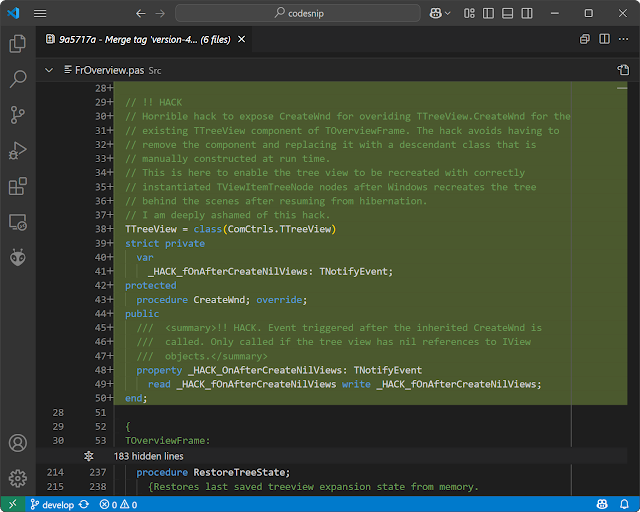
It had to happen didn't it? Not long after my post about yesterday's bug fix release of CodeSnip, Oliver reached out to point out a potential problem with the way I'd implemented it. See the linked post and comments if you're interested in the details. Suffice to say that the problem was sufficient for me to hunt for an alternative solution. Having found one I've rushed out hotfix v4.24.2 to patch yesterday's release (v4.24.1) and make it more robust. Whether or not you downloaded yesterday's you really should update CodeSnip to the hotfix release. ⮞  Get hotfix release v4.24.2 from GitHub . The fix involves a dirty hack of which I'm deeply ashamed, but it works. To be up-front about how horrible this hack is I've liberally sprinkled comments that include the text "!! HACK" in the code. Also, any new methods and fields that implement the hack have names prefixed with  _HACK_ . I need to get this patch out, so don't have time to explai...

Persistent bug in CodeSnip squashed at long last [I hope]

Image
What a red letter day. 🎆🎇🌠 For several years a nasty access violation bug has been lurking inside CodeSnip . It crashed the program when the computer was resumed from hibernation, but only sometimes. Because the bug was intermittent and required numerous hibernation / resume cycles to be run before it finally cropped up it defied diagnosis for a long, long time. Until now. Or up until someone finds my fix doesn't work for them! The bug fix release is v4.24.1 - get it from GitHub . Read on if you're interested what the problem turned out to be . CodeSnip uses a custom drawn tree view control to display the available snippets, grouped under headings. A custom TTreeNode class is used that has an extra property that references an object instance that provides extra information about the item been displayed. This information is used by the custom drawing code. The problem is that, occasionally, when waking from hibernation, Windows destroys and recreates the window handle of the...

Code Snippets Collection v2.2.3 released

Image
Version 2.2.3 of my Pascal  code snippets collection  has just been released.  Unlike the previous bumper release, this one adds compilation results with Delphi 12 for all snippets that hadn't been tested with that compiler, which was most of them. It also fixes a couple of bugs, so I recommend updating to this release. For details of the bug fixes, see the  change log . If you are using  CodeSnip  v4.16 or later then you can update your snippets collection by using the  Database | Install or Update DelphiDabbler Snippets Database  menu option and following the instructions in the resulting wizard. ➤ You can find the new release on   GitHub .

Code Snippets Collection v2.2.2 released

Image
Version 2.2.2 of my Pascal code snippets collection has just been released.  Don't let the patch version number bump fool you. There are a lot of new snippets in this release. In fact, it's the first time in years that so many new snippets have been added. Nearly all the new snippets are mathematical. A few snippets were added to the Arrays category, but most got grouped into the Mathematics category. Some snippets relate to number theory while others work with numbers in different bases. However the majority relate to statistics, including functions to calculate Arithmetic, Geometric, Harmonic, Logarithmic and Power means. I'm not going to list them all here, that would be tedious. See the change log for a full list of the new functions & other changes. A couple of existing snippets have been modified, in one case to fix a bug.  Unit tests have been added for every new snippet and for one existing snippet. All the new snippets compile without problem with Delphi XE...

CodeSnip v4.24.0 released

Image
CodeSnip v4.24.0 has just been released. There's no main feature in this release. It's a bit of a mish-mash of numerous minor bug fixes and tweaks that have been implemented since the previous release. I'm not going into detail about the numerous small changes here: check out the change log if you're interested. Do you need this release? Well, its not going to knock your socks off, but there are a couple of bug fixes, so installing it wouldn't do any harm. ✅ Get v4.24.0 from its GitHub releases page .

Released v2.2.0 of the Code Snippets Collection

Image
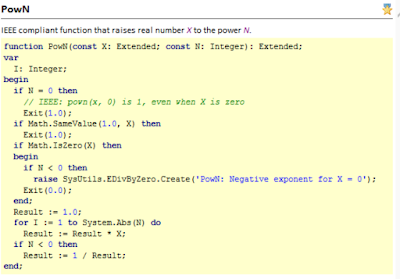
Finally, months after I meant to, I've released v2.2.0 of the DelphiDabbler Code Snippets Collection. This is a collection of snippets that can be loaded into CodeSnip program. To do so, download csdb-v2.2.0-data.zip from the GitHub release page . Unzip it somewhere on your system then run CodeSnip. Select the Install or Update DelphiDabbler Snippets Database  menu option and follow the wizard. If you would like to run tests on some of the snippets then download  csdb-v2.2.0-tests.zip  from the same place. Read the included read-me file for info about how to run the tests. Finally there's comprehensive documentation in  csdb-v2.2.0-docs.zip . In this release the main feature is the addition of a few routines to the Mathematics category. Specifically there are three IEEE conformant Pown routines and a couple of heavily overloaded summing functions. For details of these and other changes see the change log .

CodeSnip and Delphi 12.1

Image
Now that Delphi 12.1 has been released the question of whether a new release of CodeSnip is needed to work with it. The answer is no, it's not. That's because Delphi 12.1 can't be installed alongside Delphi 12.0 - it's either/or. Furthermore, Delphi 12.1 appears to CodeSnip just like Delphi 12.0, so CodeSnip will happily use it to test compile snippets if it is installed.

CodeSnip v4.23.0 Released

Image
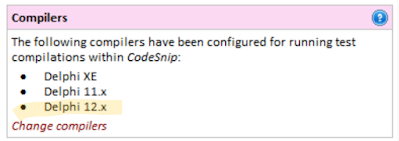
Today I released an  update to CodeSnip  that makes two little changes: The marketing names have been removed from later Delphi versions (e.g. Athens & Rio) to save space in the UI if you have several versions of Delphi registered. So now instead of seeing Delphi 12 Athens you will see Delphi 12.x , for example. The built in REML markup language that can be used to format snippet descriptions and "Extra" text, now supports the ' character entity that gets replaced by a single quote when rendered. For the complete change log see here . Compiler name changes in v4.23.0 New REML character entity in v4.23.0

CodeSnip v4.22.0 released

Image
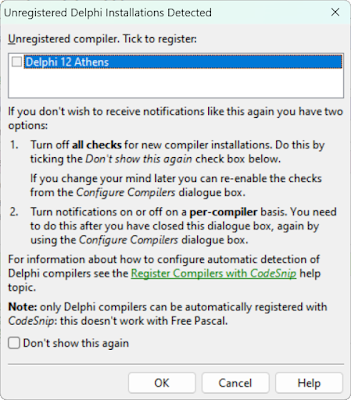
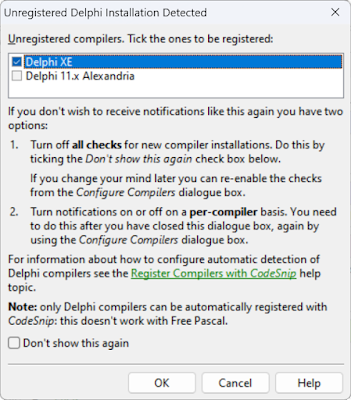
Yesterday, Delphi 12 was released as part of RAD Studio 12 "Athens" . Today there's an update to CodeSnip  that gives the option of using the new Delphi 12 to test compile your code snippets. It's really simple to configure CodeSnip to use Delphi 12. The first time you start CodeSnip after installing Delphi 12 a dialogue box will pop up and ask if you want to use the compiler alongside any other versions you may have: That will happen only if you haven't turned off the auto-register compiler option. If that's the case you'll need to use the Tools | Configure Compilers menu option to set it up yourself. The Detect Delphi Compilers button in the Configure Compilers dialogue box will do the trick: The only other user-facing change is that the list of compilers in the Configure Compilers and Find Compilers dialogue boxes is now sorted with the newest Delphi versions first instead of them being hidden down the bottom an increasingly long list. There's ...

Released CodeSnip v4.21.2 (minor bug fixes)

Image
CodeSnip v4.21.2 has been released today, 14th July 2023. This is a patch release that fixes a few minor bugs: Fixed some broken and "unsafe" (http) links in the about box. Fixed error in version information. Fixed potential XSS vulnerability in JQuery code used in the program's easter egg . Updated and clarified license & some other docs. Do you need this release? Depends on how much you're bothered about the above errors. Up to you. ⏬ Get the new release from the  v4.21.2 release page  on GitHub.

Released CodeSnip v4.21.1 (bug fix)

Image
Back in December 2022 I was quite pleased with myself for releasing the v4.21.0 update to CodeSnip . The main feature that was added in v4.21.0 work fine - automatically detecting un-registered Delphi compilers at start up - worked fine. But, oh dear, the more obscure new feature that lets you use lists in snippet descriptions was a bit of a disaster. The main implementation of lists was a bit flaky, but the main problem is that I forgot to add the implementation of lists in snippets reports and in source code comments in generated units. This pretty much trashed the reports and comments. It's taken a lot of coding to fix these bugs, hence the 4 month delay before this bug fix materialised. But I think I've managed it, although whether the new feature was worth the effort is debatable. ⏬ Get the new release from the v4.21.1 release page on GitHub. Here's what a snippet looks like in the UI when it's description contains an unordered list: Here's how the same snippe...

Released CodeSnip v4.21.0

Image
To close off the year, here's a new release of CodeSnip  that adds a couple of new features that have been in the pipeline for quite a while. The first is one I've been working on ever since a user missed out on getting Delphi 11.x Alexandria support when I added it. He expected CodeSnip to just use it when test compiling snippets. It didn't do that. I think his expectation was valid, so I decided to make CodeSnip a bit cleverer! Until now, when support for a new Delphi version was added to CodeSnip you would have to remember to tell it you wanted to use the new compiler, if you had it installed. Now, when CodeSnip starts it checks if there are any versions of Delphi on your system that are not registered with CodeSnip for use when test compiling snippets. If it finds any it offers to register them for you. This feature only works for any version of Delphi that CodeSnip knows about, which for the moment is all of them from Delphi 2 to Delphi 11.x Alexandria. This doesn...

Never make new year's resolutions - dumping CodeSnip Belvedere

Image
Over 9 years I've had three attempts at creating CodeSnip 5. All have been very ambitious. The latest was CodeSnip Belvedere, rashly announced on new year's day this year. Now I never normally make new year's resolutions, and I should have stuck with that tradition! Of course Belvedere foundered - it was way too ambitious. Again. I was overwhelmed right from the start. Just look at the repo where there have been bugger all commits . So here's a new announcement I can stick by: Belvedere is dead, abandoned, gone. The idea to rebuild CodeSnip from the ground up was an attractive proposition, but it was way too much work. Right from the start I seemed to have an inkling I might have bitten off more than I could chew, because I even queried the wisdom of the new year's resolution in the announcement itself ! And that's what all the failed attempts to create the next release have in common: the plans for the new version were always too ambitious . Maybe I've le...

Released CodeSnip v4.20.2

Just released  CodeSnip  4.20.2 which is a bug fix update to CodeSnip 4.20.1. It fixes a bug in the main menu of the UI. To replicate the bug: Drop down a main menu item. Select an item on the dropped down menu using the cursor keys. Do not press enter. Press F1. This raises an exception in CodeSnip prior to v4.20.2 This release also update Windows OS Version detection to correctly detect Version 22H2 of both Windows 10 & 11. Because of the bug fix, I do suggest updating. As usual you can download the program from  GitHub  or from SourceForge: Download Standard Edition   Download Portable Edition Source is available to download from both  SourceForge  or  GitHub . Alternatively you can fork away in the  GitHub repo  - the master branch always contains the source of the latest release, while the develop branch has the latest development source and may not be stable.

Released CodeSnip v4.20.1

Just released CodeSnip 4.20.1 which is a bug fix update to CodeSnip 4.20.0. It fixes a problem in the library that detects operating system version information and makes a few minor documentation changes. There are no changes to functionality. Because of the bug fix, I do suggest updating. As usual you can download the program from  GitHub  or from SourceForge: Download Standard Edition   Download Portable Edition Source is available to download from both  SourceForge  or  GitHub . Alternatively you can fork away in the  GitHub repo  - the master branch always contains the source of the latest release, while the develop branch has the latest development source and may not be stable.

CodeSnip 4.20.0 executables now available on GitHub

I've managed to work around the problem I had yesterday when my antivirus program prevented me from uploading files to CodeSnip's releases page on GitHub. So, the executable files are now available to download from the Assets section. And how don't need to toddle over to SourceForge to get them! Here's the revised release page . I've updated yesterday's blog post too.